Plenty of designers and marketers stay on a Creative Cloud subscription long after they only need core photo editing. The blocker is rarely feature parity. It is workflow memory: where tools sit, which keys transform a layer, how panels dock.
GIMP is capable and free. Its defaults are built for GIMP veterans, not for someone who has edited in Photoshop for a decade. Community layout packs (PhotoGIMP is the best known) replace config files so GIMP 3 opens with a familiar single-window layout, darker chrome, and Adobe-style shortcuts.
This is not a magic free Photoshop. It is an on-ramp so you can edit today while you learn what is different under the hood.
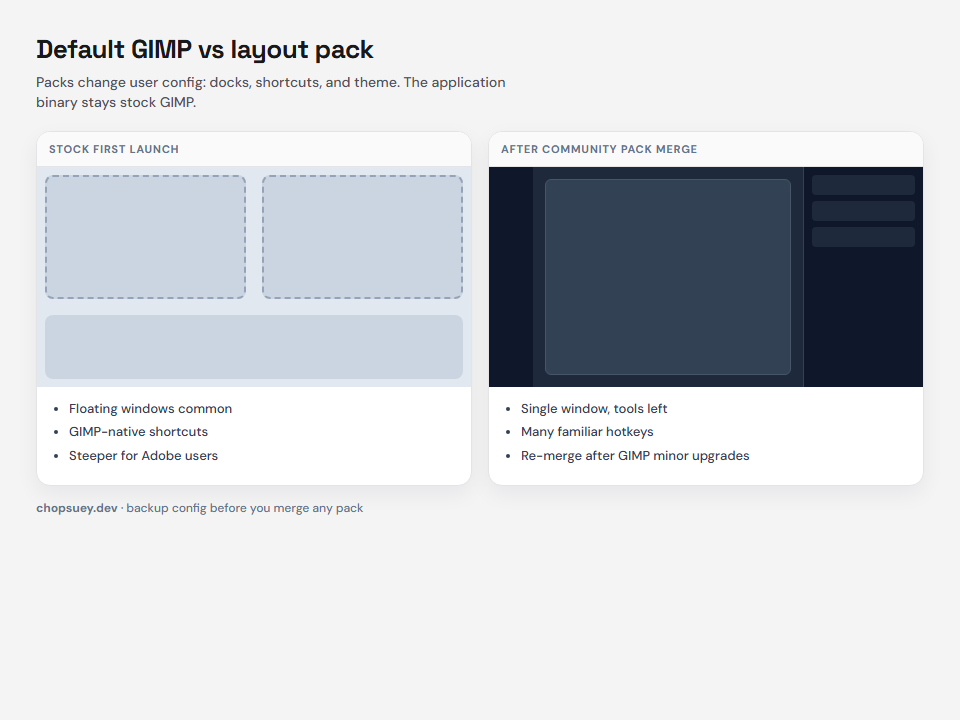
What changes and what does not
| Area | With a layout pack | Still on you |
|---|---|---|
| Panel layout | Toolbox left, layers right, familiar stack | File formats, some filter names |
| Shortcuts | Many Adobe defaults | GIMP-only tools and menus |
| Look | Dark theme, simplified tool icons | Brand color workflows, actions/scripts |
| Cost | GIMP stays free | Time to re-test print and export settings |
Professional teams still need to validate color management, PSD handoff, and plugin dependencies before they cancel Adobe seats. Solo creators and small shops often find GIMP enough once the UI stops fighting them.
Before you copy any files
- Install GIMP 3.0 or newer. Most current packs target the 3.x config tree, not legacy 2.x folders.
- Launch GIMP once, then quit. That creates the user config directory the pack will merge into.
- Back up your existing GIMP profile if you already customized GIMP. Packs overwrite default config files in that version folder, not the program binary.
On Windows, zip %APPDATA%GIMP before you merge. On macOS, back up ~/Library/Application Support/GIMP.
Where files go (by platform)
Read the pack README for the exact version folder inside the archive.
Windows: Win+R, %APPDATA%GIMP, merge the pack version folder and allow replace when prompted.
macOS: Finder → Go to Folder → ~/Library/Application Support/GIMP, merge the same way. Use Terminal merge commands if Finder skips files.
Linux: Usually ~/.config/GIMP/ or paths your distro documents. Merge the matching version directory only.
Why the UI suddenly feels familiar
- Session and dock layout for a single main window
- Tool order aligned with common retouching workflows
- Shortcut maps for keys your hands already know
- Theme density tuned for long dark-canvas sessions
You still open XCF natively. PSD import and export exist but treat complex PSDs as a test case, not a guarantee.
Subscription math vs learning curve
GIMP removes a recurring subscription when you only need core editing. The tradeoff: you own maintenance. Community packs do not always ship the same day as a new GIMP minor version. GIMP often creates a new config subdirectory per minor release, so you may need to merge the pack again into the new folder.
Pin a known-good GIMP and pack pair, upgrade both together, and keep your backup zip.
Who should use a layout pack
Good fit: you know Photoshop basics, you want to trial an Adobe exit, you can re-apply config after upgrades.
Think twice: niche Photoshop-only plugins, team Creative Cloud libraries, or print workflows that expect Adobe tooling end to end.
A one-week trial plan
- Day 1-2: Install GIMP 3, apply the pack, redo one real project.
- Day 3-4: Map three weekly tasks and note gaps.
- Day 5: Decide keep GIMP, hybrid, or stay subscribed with a clear reason.
Bottom line
GIMP does not need to become Photoshop to replace a subscription you barely use. A maintained layout pack buys a head start. Back up, merge carefully, and plan for version bumps.
chopsuey.dev
Shopify development, websites, and workflow automation for stores that outgrew templates. Projects → · Let’s talk →